We specialize in transforming your digital presence and driving growth through a range of top-notch services. Whether you're a startup or an established business, our expertise can help you reach new heights.
Why Is My Website Not Showing Up on Google? A Columbus Business Owner’s Fix Guide
You built the website. You paid for hosting. You even told your customers about it. But when you type your business name into Google — or worse, search for the services you offer in Columbus — your site is nowhere to be found.
You’re not alone. This is one of the most common frustrations we hear from Columbus Ohio small business owners. And the good news: in the vast majority of cases, there’s a specific, fixable reason your website isn’t showing up. Sometimes it’s a single setting. Sometimes it’s a combination of issues that compound over time.
This guide walks through the five most common culprits — with actionable steps you can take right now to diagnose and fix each one.
## 1. Google Hasn’t Indexed Your Site (Or Has Stopped)
Before Google can show your website in search results, it needs to know your site exists. That process is called indexing — Google’s bots crawl your pages and store them in a massive index. If your pages aren’t indexed, they simply don’t exist as far as Google is concerned.
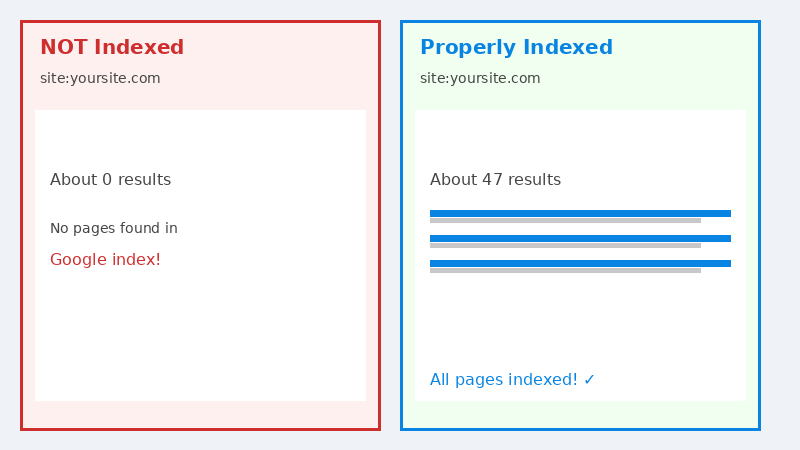
The fastest way to check: go to Google and search site:yourdomain.com. If no results appear, your site isn’t indexed. If only a handful of pages appear when you have dozens, something is blocking the crawl.
The most common indexing blockers are:
A “noindex” tag left on accidentally — Many website builders and WordPress themes add a discourage search engines setting during development. It’s easy to forget to turn it off before launch. Check your WordPress Settings → Reading and confirm “Discourage search engines from indexing this site” is unchecked.
A missing or broken XML sitemap — Your sitemap is a roadmap that tells Google which pages to crawl. Without it, Google may miss entire sections of your site. You can verify yours exists by visiting yourdomain.com/sitemap.xml.
Broken internal links or redirect loops — If Google’s bots follow a link and hit an error page repeatedly, they’ll deprioritize crawling your site. A tool like WebsiteLinter.com can scan your site for broken links and redirect chains at no cost.
Fix it: Submit your sitemap directly in Google Search Console (free). Under Index → Sitemaps, add your sitemap URL and request indexing for key pages individually. It typically takes 1–14 days for changes to appear in search results.
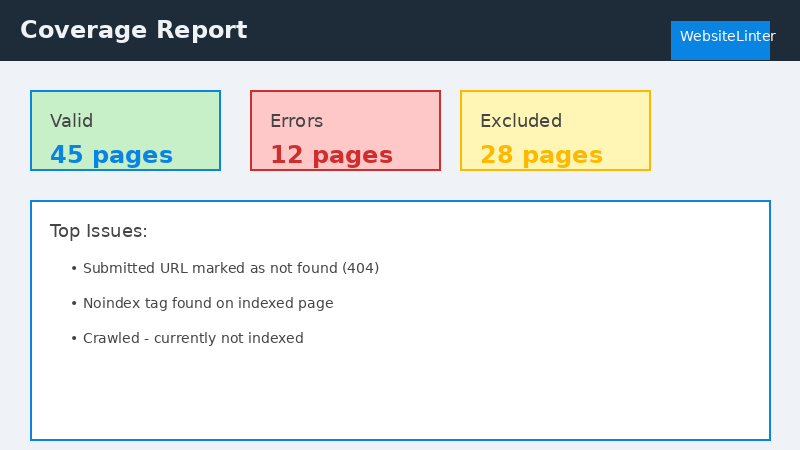
Use Google Search Console’s Coverage report to diagnose indexing issues
## 2. Your Technical SEO Is Failing Google’s Quality Bar
Even if Google has indexed your site, a poor technical experience can push your pages to page 3, 4, or beyond — effectively invisible. Since 2021, Google has officially incorporated Core Web Vitals into its ranking algorithm. These three metrics measure real-world page experience:
Metric
What It Measures
Good Threshold
Common Cause of Failure
LCP (Largest Contentful Paint)
How fast your main content loads
Under 2.5 seconds
Unoptimized images, slow hosting
INP (Interaction to Next Paint)
How quickly the page responds to clicks/taps
Under 200ms
Too much JavaScript, third-party scripts
CLS (Cumulative Layout Shift)
Visual stability — does content jump around?
Under 0.1
Images without dimensions, late-loading ads
Imagine a local Columbus contractor whose homepage loads in 6 seconds on mobile because it has a 4MB hero image. Google’s algorithm measures that slow experience and ranks the page lower than a competitor whose site loads in 1.8 seconds — even if the contractor’s content is better.
Fix it: Run your site through PageSpeed Insights (free). It gives you a score from 0–100 and lists exactly which issues to fix, in priority order. Compress images (aim for under 200KB per image), remove unused plugins, and enable browser caching. If your score is below 50 on mobile, a technical audit from a web professional may surface issues you can’t easily diagnose manually.
Compare indexed vs non-indexed sites using the site: search operator
## 3. Your Google Business Profile Is Incomplete or Unclaimed
For Columbus Ohio small businesses targeting local customers, your Google Business Profile (GBP) is often more important than your website for initial search visibility. The “Map Pack” — the three business listings that appear above regular search results for local queries — is powered entirely by GBP data, not your website.
According to BrightLocal’s 2023 Local Consumer Review Survey, “98% of consumers used the internet to find information about local businesses in the past year.” If you’re not showing up in Maps, you’re missing the majority of local searchers before they even reach your website.
The most damaging GBP mistakes are:
Unclaimed profile — Google auto-generates business profiles from public data. If you haven’t claimed yours, you have no control over the information shown.
Incomplete business hours or missing phone number — Google rewards complete profiles. Missing fields reduce your visibility in the Map Pack.
No recent reviews or unanswered reviews — A profile with 40 reviews averaging 4.2 stars outranks one with 5 reviews averaging 4.9 in most competitive categories. Review velocity matters.
Wrong business category — If you’re a Columbus web design agency categorized as a “Computer Store,” Google won’t show you for relevant queries.
Fix it: Visit business.google.com, claim your profile, and fill out every field — especially your primary business category, service area, business description (use your focus keywords naturally here), and service list. Add real photos of your work, your team, and your location. Then set up a process to actively request reviews from satisfied customers.
## 4. Your Business Name, Address, and Phone Number Are Inconsistent Online
This one surprises most business owners. Google cross-references your business information across dozens of online directories — Yelp, Yellow Pages, Facebook, industry-specific directories, Chamber of Commerce listings — to verify that your business is legitimate and trustworthy.
When your NAP (Name, Address, Phone number) is inconsistent across these sources, it creates a trust problem. A Moz study on local ranking factors consistently identifies “citation consistency as one of the top signals” for local search rankings. Getting this wrong doesn’t just hurt your rankings — it confuses customers who call the wrong number or show up at an outdated address.
Audit these platforms first:
Google Business Profile
Yelp
Facebook Business Page
Bing Places for Business
Apple Maps Connect
Better Business Bureau
Your local Columbus Chamber of Commerce listing
Industry-specific directories relevant to your field
Fix it: Use a tool like BrightLocal or Whitespark to run a citation audit. Both have free tiers that show where you’re listed and where discrepancies exist. Correct each listing to match your GBP exactly — same legal business name format, same phone number, same address format (including suite/unit notation).
Quick Diagnostic: Use WebsiteLinter to Identify Your Problem
A slow, poorly structured website is the root cause of most Columbus small business ranking problems. If your site needs a redesign before SEO can work, our Columbus web design guide walks through what a proper rebuild should include — from local SEO architecture to Core Web Vitals.
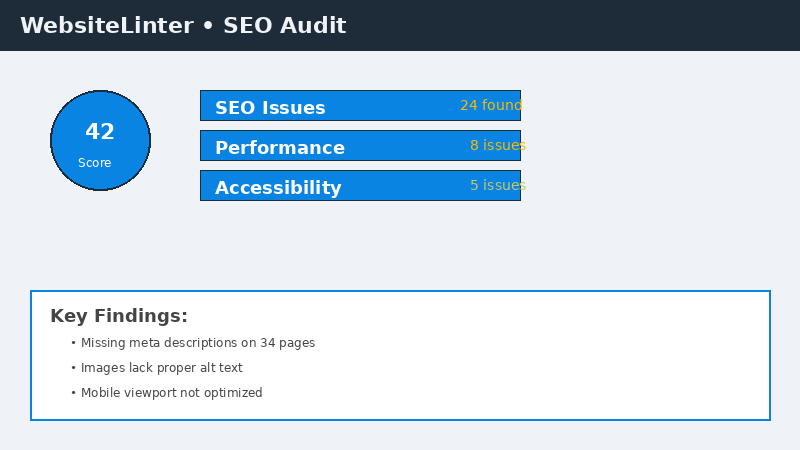
Trying to figure out which of these issues is actually affecting your site? Here’s a quick way to find out: WebsiteLinter.com is a free website audit tool that scans for exactly these kinds of problems. In seconds, WebsiteLinter runs over 100 checks on your website and generates a detailed report showing:
For a Columbus business owner, running a quick WebsiteLinter scan takes five minutes and often reveals exactly why your site isn’t showing up on Google. The report gives you a clear prioritized list of fixes, so you’re not guessing which problem to solve first.
Pro tip: Screenshot your WebsiteLinter results before and after you make changes. Many of our clients have used this to document their SEO improvements for their accountants and business advisors — it shows measurable progress.
WebsiteLinter dashboard showing indexability and technical SEO issues
## 5. Your Website Content Doesn’t Match How Customers Actually Search
This is often the most damaging issue — and the hardest to see from the inside. You understand your business, so you write about it using the language you use internally. But your customers search using completely different words.
Consider a Columbus accounting firm that calls its core service “financial lifecycle management.” Their potential customers are searching for “bookkeeping for small business Columbus Ohio” or “small business CPA near me.” If your website only uses industry jargon and doesn’t include the plain-language phrases your customers type into Google, you won’t appear for those searches — no matter how excellent your content is.
According to Search Engine Land’s 2024 research, “the vast majority of search queries are long-tail phrases (four words or more).” “Web design” is too competitive for a local agency to rank for. “Small business website design Columbus Ohio” is exactly the kind of specific, intent-driven phrase where you can compete and win.
Common content mistakes that tank local Columbus businesses:
Thin service pages — A single paragraph describing what you do isn’t enough. Google wants to see pages that thoroughly answer a searcher’s question, typically 600–1,200+ words for competitive local terms.
No location signals on key pages — Mentioning Columbus, Ohio naturally in your service pages, About page, and footer helps Google understand who you serve and where.
No FAQ or blog content — Customers have questions before they hire anyone. A business that answers “How much does a new website cost in Columbus?” on their blog captures a customer at the research phase that a competitor ignores.
Missing title tags and meta descriptions — These are the clickable headline and description that appear in Google results. If they’re auto-generated or empty, Google picks whatever content it wants — often not the most compelling text on your page.
Fix it: Start with free research. Search for your main service + “Columbus Ohio” and study what appears on page one. What questions do those pages answer that yours doesn’t? Use Google’s “People also ask” section and “Related searches” at the bottom of results — those are real queries from real customers. Write content that answers those questions directly, clearly, and with more depth than what currently ranks.
## Your Next Step: A Systematic Diagnosis
The frustrating reality is that it’s rarely just one of these problems. Most websites struggling with Google visibility have a combination of issues — an incomplete GBP, a few broken links, thin service pages, and NAP inconsistencies that together suppress rankings across the board.
The good news: each problem has a clear fix, and fixing them compounds over time. Resolve your indexing issue, improve your Core Web Vitals, build out your GBP, clean up your citations, and write content that matches real search intent — and you’ll see your rankings climb over the following weeks and months.
If you’d rather have an expert diagnose exactly what’s holding your site back, Lindsey Web Solutions works with Columbus Ohio businesses to identify and fix the specific issues keeping them off page one. We’ll audit your site, your GBP, your citations, and your content — and give you a prioritized action plan based on what will make the biggest difference fastest.
Want to know exactly which of our services can help your website show up on Google? View our full web design and local SEO services for Columbus Ohio small businesses.Contact Lindsey Web Solutions today to schedule your free website visibility review. No jargon, no sales pressure — just a straightforward look at why your site isn’t showing up and exactly what it will take to fix it.