Internal Linking Sprint: How We Built Topic Clusters & Money-Page Bridges Across 84 Blog Posts
Why 84 Published Posts Were Barely Moving the Needle
Last month we pulled our Google Search Console data and saw a sobering number: 1 click from 73 impressions across 28 days. For a Columbus-based web design agency with 84 published blog posts, that stat stings. We had the content library. We had the expertise. What we lacked was architecture.
Every post existed in isolation. A reader could land on our guide about mobile-friendly design, learn something useful, and then bounce—because nothing inside the article invited them deeper. Navigation menus and footer links do not count. Google’s crawlers saw 84 separate documents with no topical relationships. PageRank entered each post and died there.
We needed an internal linking sprint. Not a slow editorial tweak, but a systematic rebuild that would map every post into a topic cluster, bridge each cluster to a relevant money page, and turn our blog from a content graveyard into a conversion funnel. Here is exactly what we did, why it works, and how a business like yours can replicate it.
What Are Topic Clusters and Why Do They Matter?
A topic cluster is a content architecture model built from two pieces: a pillar page (the broad hub) and cluster content (the specific spokes). The pillar covers a topic in depth and links out to each cluster post. Every cluster post links back to the pillar and to other related posts in the same cluster.
Imagine a local dental practice that publishes a pillar page titled “Complete Guide to Dental SEO in Columbus Ohio.” The cluster might include posts on “How to Optimize Your Google Business Profile for a Dental Practice,” “Website Speed Tips for Healthcare Providers,” and “Why Patient Reviews Affect Local Rankings.” Each post links to the pillar, the pillar links to each post, and the posts link to one another. Google sees a dense web of related content and rewards the site with stronger topical authority.
According to a 2023 HubSpot study, companies that organize content into topic clusters see up to a 40 percent increase in organic search visibility compared to sites that publish disconnected articles. The reason is simple: clusters help search engines understand what you own, not just what you wrote.
How We Mapped 84 Posts Into Four Clear Clusters
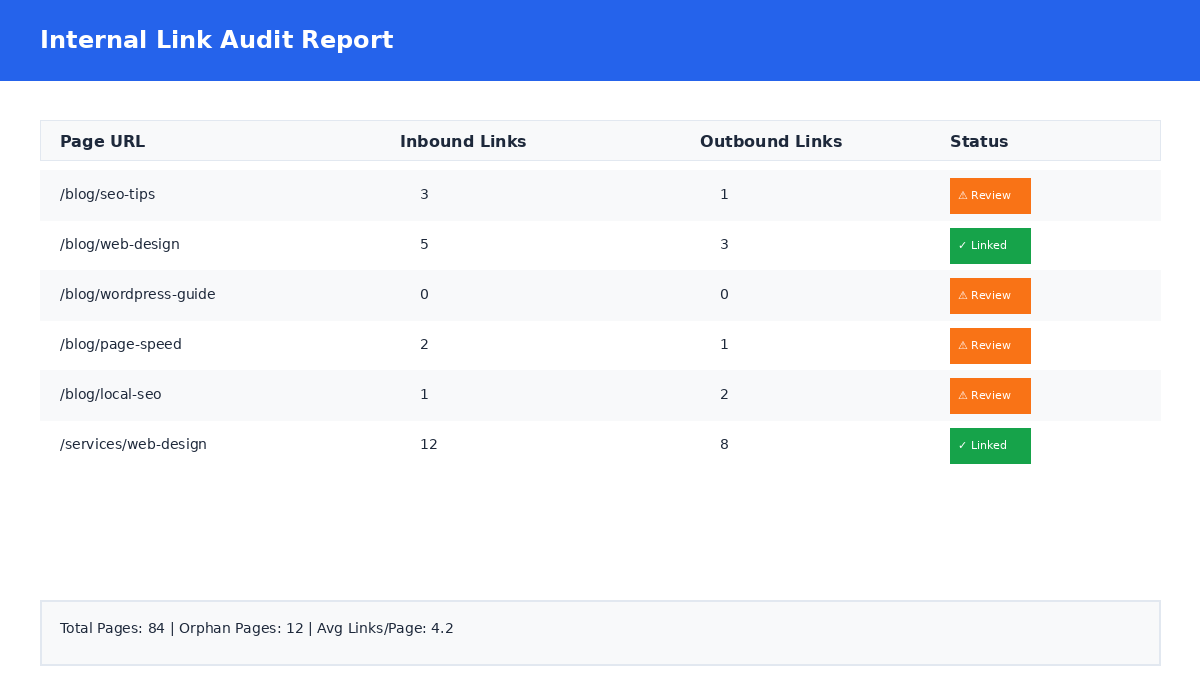
We started with a full content audit. We exported every published post, stripped out the 22 test posts and duplicates that had polluted our sitemap, and sorted the remaining 60-plus articles by theme. Four dominant categories emerged:
- Web Design & Development — posts about platform comparisons, redesign signals, mobile optimization, and agency selection.
- SEO & Local Search — posts about Google Business Profile, local rankings, Search Console, and AI search optimization.
- Website Maintenance & Security — posts about update schedules, speed optimization, hacking prevention, and content recovery.
- Lead Generation & Conversions — posts about trust signals, conversion mistakes, 404 fixes, and content audits.
For each cluster we created a dedicated hub page. The hub is not a category archive; it is a curated landing page that introduces the topic, summarizes the value of each linked article, and closes with a clear call to action. We published the hubs at clean URLs so they could become landing destinations of their own:
/web-design-development-columbus-small-businesses-hub//seo-local-search-columbus-small-businesses-hub//website-maintenance-security-small-businesses-hub//lead-generation-conversion-optimization-small-business-hub/
Once the hubs were live, we manually reviewed every cluster post and inserted two to three contextual inline links to related posts within the same cluster. Anchor text was descriptive, not generic. Instead of “click here,” we used phrases like “our guide to choosing a custom website over a template” or “the local SEO checklist we recommend for Columbus small businesses.”
Building Money-Page Bridges: From Reader to Revenue
Topic clusters help search engines. Money-page bridges help your bottom line. A money-page bridge is a contextual link inside an informational blog post that points to a commercial page—your services, pricing, contact, or audit offer—using anchor text that matches the reader’s intent.
Here is the difference. A footer link to “Services” is passive. A sentence inside a post about website speed that reads, “If your load times are above three seconds, our Columbus website optimization services include a full performance audit,” is active. It solves a problem and offers the next step in the same breath.
We added at least one money-page bridge to every cluster post. The destination depended on the article’s topic:
| Cluster | Typical Post Topic | Money-Page Bridge Destination |
|---|---|---|
| Web Design | Mobile-friendly redesign tips | /services/ or /website-checklist/ |
| SEO & Local Search | Google Business Profile optimization | /services/ or local suburb landing pages |
| Maintenance & Security | WordPress update schedules | /services/ or maintenance plan pages |
| Lead Generation | Trust signals that convert visitors | /contact-us/ or /services/ai-audit/ |
We also added a “Related Services” callout block to the bottom of high-traffic posts. The block is short—two sentences and a button—but it appears only on posts that already demonstrate strong engagement, so it does not dilute the reader experience on weaker pages.
The Technical Checklist We Used to Stay Consistent
An internal linking sprint only works if the rules are clear. We created a short checklist and applied it to every post before marking it complete:
- Remove broken links. We ran a scan with WebsiteLinter and fixed every 404 before adding new links.
- Add two to three contextual links to related cluster posts. Anchor text must describe the destination page topic.
- Add one money-page bridge. The link must appear in the first 60 percent of the article body, where reader attention is highest.
- Link to the cluster hub. Every cluster post links back to its pillar hub with a phrase like “read the full guide” or “back to the hub.”
- Avoid orphan pages. Any post with zero incoming links from other posts received at least one bridge from a higher-traffic article.
- Submit for re-crawling. After publishing updates, we submitted the URLs through Google Search Console to speed up indexation.
This checklist kept our team aligned. It also made the sprint measurable: we could track progress by the number of posts that passed all six items.
Early Results and What We Learned
It is too soon to report year-over-year traffic shifts—the sprint finished days ago—but the structural improvements are already visible. Our sitemap dropped from 84 indexable posts to a cleaner set of authoritative articles. Crawl budget is no longer wasted on test posts and duplicates. Every real post now has a clear parent hub and at least one path to a commercial page.
We also learned three lessons that will shape our future content:
- Audit before you architect. We found 22 test posts and 5 duplicates hiding in our sitemap. Those pages were diluting our authority. Deleting or redirecting them was just as important as adding new links.
- Context beats templates. Footer links to /services/ existed for years and generated almost zero clicks. Inline contextual links in the first half of an article perform better because they meet the reader at the point of need.
- Hub pages need their own promotion. A cluster hub is only useful if Google can find it. We submitted each hub to Search Console, added them to our main navigation under Resources, and linked to them from our homepage.
A 2024 study by Ahrefs found that pages with strong internal linking profiles rank significantly higher than orphan pages with the same backlink count. In other words, the links you build inside your own site are a ranking factor you fully control.
How to Run Your Own Internal Linking Sprint
You do not need 84 posts to benefit from this strategy. Even a dozen articles can form two tight clusters. Start with these steps:
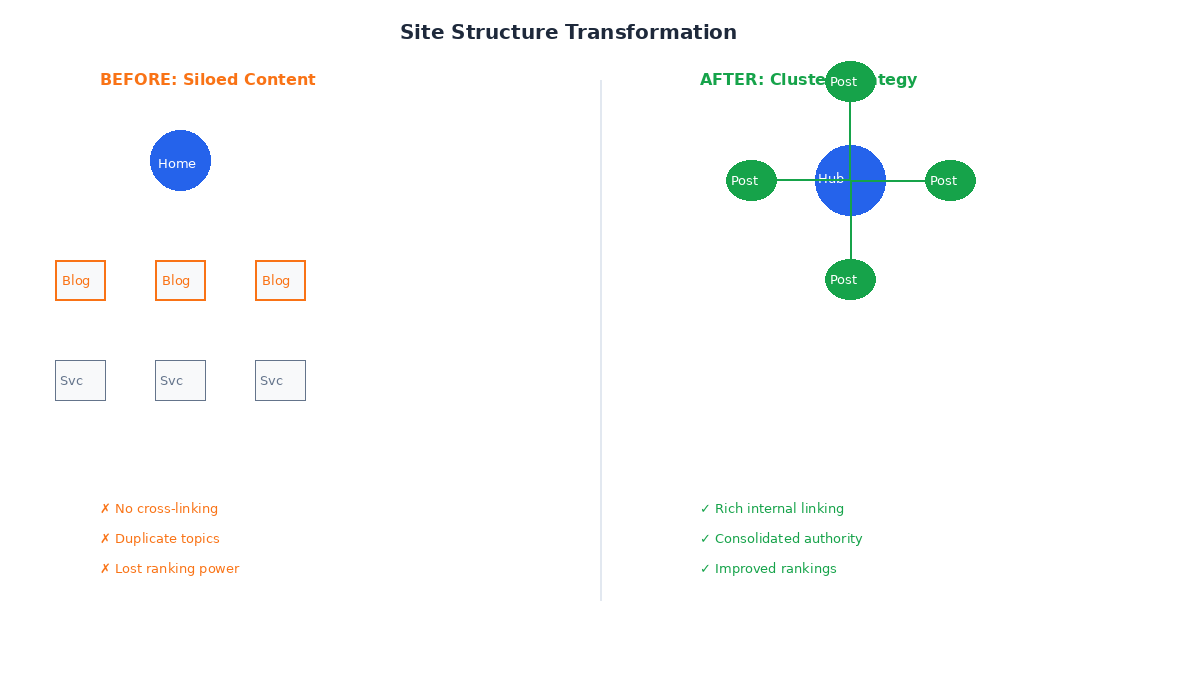
- Export your posts and group them by topic. Look for natural themes, not keyword matches.
- Choose one pillar topic where you have the most expertise and the highest business value.
- Write or update a hub page that links to every post in the cluster and ends with a services CTA.
- Edit each cluster post to add two contextual links to sibling posts and one bridge to a money page.
- Submit everything to Google Search Console and monitor index status over the next two weeks.
If the technical work feels overwhelming, start with a single cluster. The momentum of seeing one hub gain impressions will motivate you to finish the rest.
Ready to Turn Your Blog Into a Conversion Funnel?
At Lindsey Web Solutions in Columbus, Ohio, we build websites and content systems that work together. Our internal linking sprint transformed 84 orphan posts into a structured library that guides readers from education to action. We can do the same for your business—whether you need a full content audit, a cluster hub strategy, or a website rebuilt around conversion.
Contact our team today and tell us about your content. We will map your clusters, build your bridges, and make sure every post earns its keep.
Related: Looking for a partner to execute your internal linking strategy? Explore our Columbus web design and SEO services.